

KNPL Variance Project Documentation
Flowmeters Live – Mass Flow Meter Dashboard
Steps to Access
- Open the application shortcut pinned to the Taskbar or use the shortcut available on the Desktop.
- Login with your Username and Password. If you forget your password, contact the Admin.
- From the Main Dashboard, use the navigation menu on the left.
- Click on FTM Live to open the real-time Mass Flow Meter Dashboard.
1. Overview
The FTM Live dashboard provides real-time monitoring of all flow meters that are related and connected to the 12 tanks. It continuously streams the latest available values for input and output, allowing operators to validate live flow conditions and ensure smooth operations.
2. Measurement Parameters
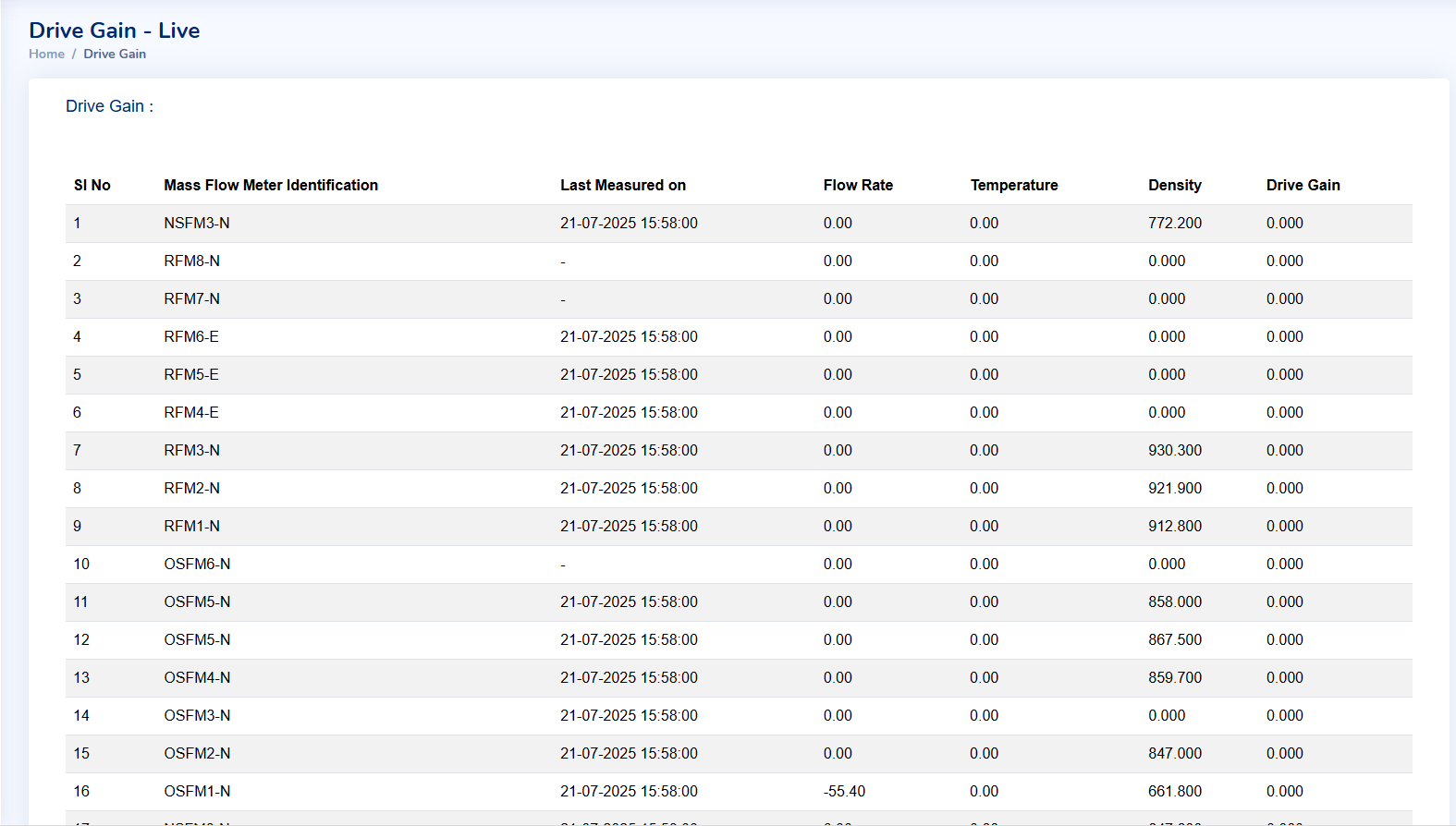
Figure: Measurement Parameters from Mass Flow Meters
Each mass flow meter provides the following real-time parameters:
- Flow Rate – Instantaneous input/output measurement for connected tanks.
- Temperature – Current fluid temperature inside the line.
- Density – Ensures consistency and quality of material flow.
- Drive Gain – Diagnostic measure to monitor sensor calibration and performance.
These live parameters make FTM Live a diagnostic and operational tool, enabling plant staff to react to process deviations as they happen.