

KNPL Variance Project Documentation
New Solvent Yard SCADA
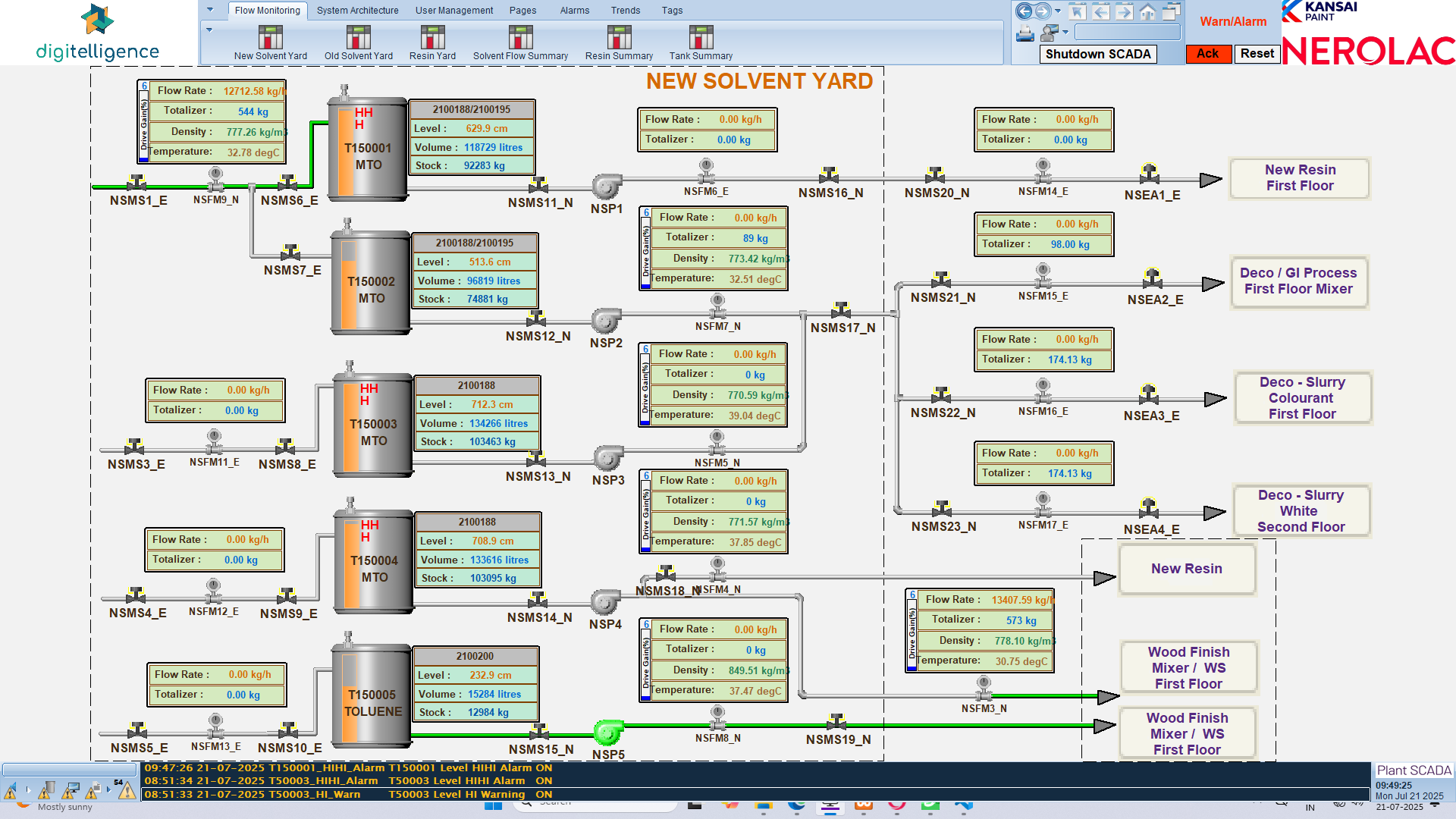
The New Solvent Yard SCADA screen provides a real-time view of the five tanks (T150001 to T150005) along with their associated pipelines and flow meters. It is used for continuous monitoring of flow, volume, and level conditions across tanks and connected processes.
Each tank is displayed with the following live parameters:
- Flow Rate (L/H)
- Totalizer (KL)
- Level (cm/% representation)
- Volume (KL)
Steps to Access
- Log into the Plant SCADA system.
- From the top navigation bar, click Pages.
- Select New Solvent Yard from the list of available screens.
- The live monitoring screen will be displayed as shown above.
Standard Operating Procedure (SOP)
- Verify that all tanks display valid Flow Rate, Totalizer, Level, and Volume values.
- Monitor pipelines for active transfers; confirm that outputs align with downstream process requirements.
- Cross-check SCADA values against Variance Dashboard to validate data integrity.
- If any parameter shows abnormal or zero values, raise an alert with the control room.
- Use the SCADA timestamp at the bottom right to ensure the screen reflects the latest live data.