

KNPL Variance Project Documentation
Profile Settings
Steps to Access
- Login to the application using your credentials.
- From the Main Menu, navigate to Profile Settings or click on your profile avatar.
- You will be redirected to the Profile Settings page where your account details are displayed.
Standard Operating Procedure (SOP)
- Review your personal details displayed on the page:
- Full Name
- User Name
- To change your password:
- Enter your Current Password.
- Enter a New Password and confirm it.
- Click Save to update your password.
- Ensure that your email and username are correct; these cannot be changed directly.
- Logout and login again if required after changing your password.
1. Profile Details
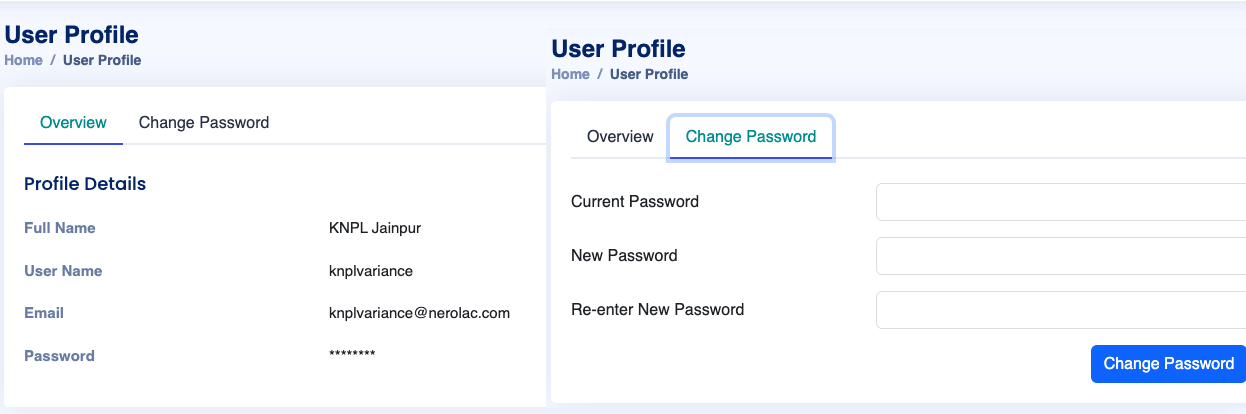
Figure: Profile Settings Page with Editable Password
The Profile Settings page displays the following fields:
- Full Name: Your registered full name (read-only).
- User Name: Your login username (read-only).
- Email: Registered email address (read-only).
- Password: Change your password by entering the current and new password.
2. Changing Password
The password change workflow ensures account security:
- Enter your Current Password.
- Enter a New Password and Confirm New Password.
- Click Save to update your password.
Note: Make sure your new password meets the required complexity criteria (e.g., minimum 8 characters, uppercase, lowercase, numeric, special character).